Login to Ask a Question or Reply

Forum Replies Created by Vishwas R
-
Uday,
Sorry this feature is not available as of now.
B. Jansen,
‘error: CanvasJS not defined’ is thrown when canvasjs.min.js is not loaded but chart render() is called.
Rendering chart with local js-file or from website should work fine. Kindly create jsfiddle with your issue, so that we can look into it and help you out.
You can check our Release Blog for all update/release history.
October 26, 2016 at 6:09 pm in reply to: RangeColumn & IndexLabel – only one value on top of Y #13050indexLabel and indexLabelFormatter at dataSeries will be overridden by indexLabel and indexLabelFormatter at dataPoint level. Assigning indexLabelFormatter at dataPoint level will work in your case.
—
Vishwas RSorry, we were working on some major features like multiple axes. We will look into this issue and get back to you at the earliest.
Aggaton,
Sorry, this feature is not available as of now. But in coming days, we will be exposing chart properties using which you can solve this issue.
Rohan,
Sorry this feature is not available as of now. But with few lines of jQuery code you can achieve this. Please check this jsfiddle.
Sathya,
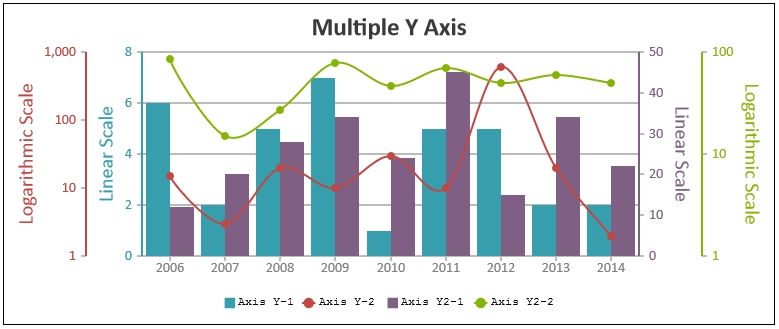
We have just released v1.9.5 Beta which supports Secondary X Axis and Multiple X / Y Axis. Please refer to the release blog for more information.
Alex,
We have just released v1.9.5 Beta which supports Secondary X Axis and Multiple X / Y Axis. Please refer to the release blog for more information.
October 18, 2016 at 12:02 am in reply to: multiple value axes and line chart with different color #12851[Update]
Hi,We have just released v1.9.5 Beta which supports Secondary X Axis and Multiple X / Y Axis. Please refer to the release blog for more information.
—
Vishwas RB. Jansen,
Thanks for reporting. We have fixed the issue and releasing in couple of days.
—
Vishwas ROctober 15, 2016 at 10:19 am in reply to: Using StackedArea100 % chart not covering full background #12750Akshada,
Sorry, as of now its not possible to access plotArea through css or to make plotArea cover the whole canvas. But giving user control over the padding to the entire chart/canvas is in our roadmap.
For security reasons, browsers restrict cross-origin requests. Please refer stackOverflow for more information.
October 13, 2016 at 7:58 pm in reply to: Using StackedArea100 % chart not covering full background #12739October 13, 2016 at 6:12 pm in reply to: Changing decimal point into comma in combination with #total #12737Jansen,
Please refer to yValueFormatString documentation.—
Vishwas R
Team CanvasJS
